One button, and every agent stops
Agents in Wantzel Studio work on their own: they answer mail, pick up tickets and hand work to each other. The emergency stop puts all of it still at once, and only a person starts it again.
You can also stop one role, one piece of work or one agent, and let the rest carry on.
How it works
-
Stop everything at once
The emergency stop sits in the header of your organisation, next to its name and mode. Press it, and every agent that is running for the organisation is stopped. Not asked to finish, not warned first: stopped. Mail, tickets and hand-overs wait.
- One button stops every running agent of the organisation at once.
- Only a person lifts a stop.
Before: everything runs
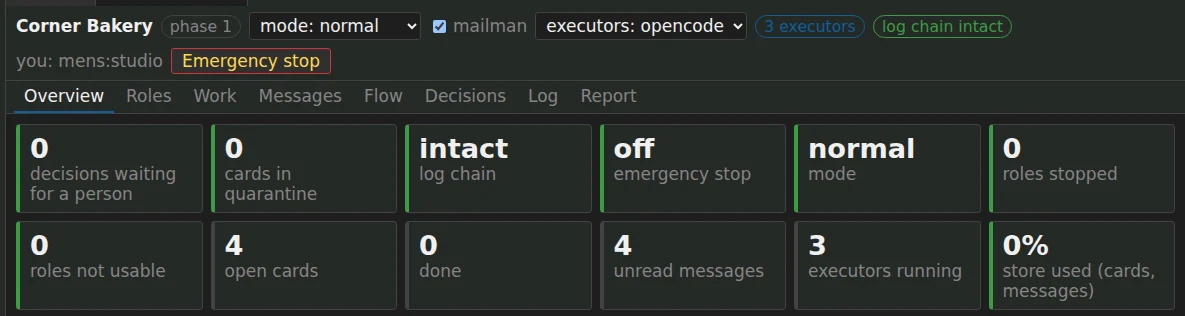
After the emergency stop
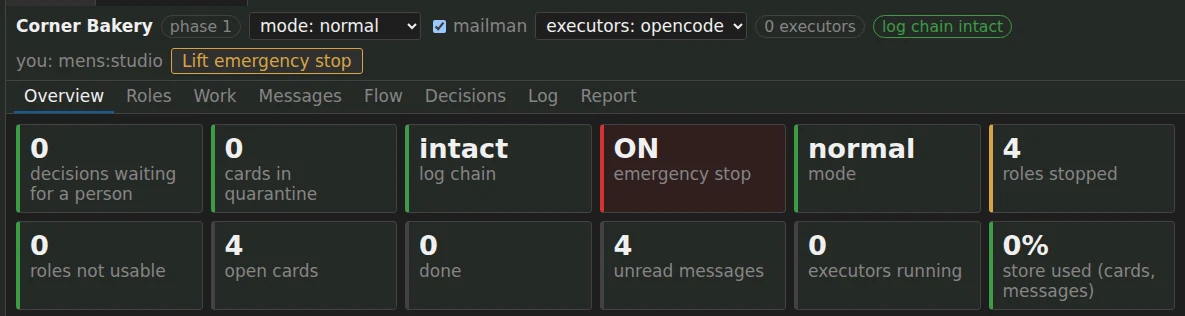
The Organisation tab of a demo bakery, before and after the emergency stop: the executors went from three to none, every role stopped, and only Lift emergency stop is left to press. -
Or stop just one thing
Not everything has to stop when one thing looks odd. Stop one role, one piece of work or one agent, and the rest keeps going. A fleet of agents has its own Stop all, which also stops what each agent started; runs that had finished keep their result.
- Stop one role, one piece of work or one agent, without stopping the rest.
- Stop all agents, and what each one started; finished runs keep their result.
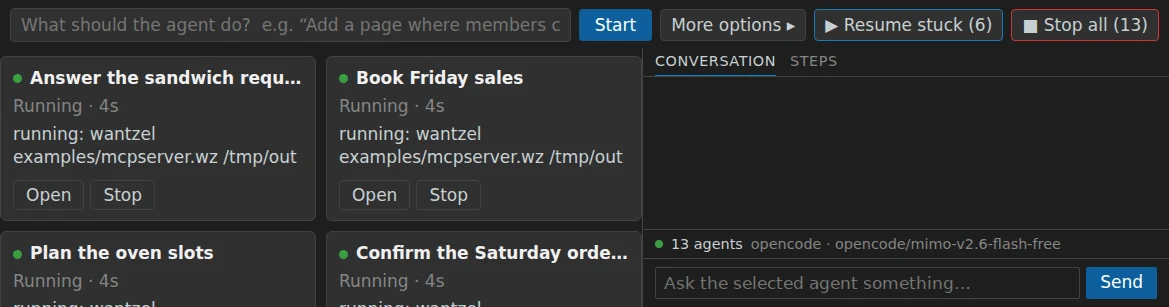
The Agents panel in a demo studio: every agent has its own Stop, Stop all stops the whole fleet, and Resume stuck puts the stopped ones back to work. -
Turn it down instead of off
Between running and stopped there are lighter modes, in which only the roles you marked for it get new work. The organisation goes down a mode at once. It goes up again only when a person says so, and one step at a time.
- Down to a lighter mode at once; up again only by a person, one step at a time.
-
Carry on where it stopped
When you are ready, agents that stopped without finishing go back to work in one go. Each picks up the same task, with what it had already said, and first looks at what is on disk, so nothing is done twice.
- Stopped agents go on where they stopped, in one go.
- Every stop is in the log, in a chain that shows any change afterwards.
Why a stop has to be built in
An agent that works on its own can go wrong in ways a person at a keyboard would notice at once:
- It goes round in circlesThe same step again and again, each one costing time and AI usage.
- It sends what it should notA mail to the wrong person, a message in the wrong tone.
- It reads an instruction in someone else's textA mail or a web page that tries to steer it.
- Two agents work against each otherOne undoes what the other did.
- In every caseYou want to stop it now, see what happened, and go on when it is right. In Wantzel Studio that is one button, and the log shows what happened.
The stop is the last line. Before it come the rules each role works within, a gate on what goes out, and a supervisor that stops an agent which goes quiet or keeps failing.
Worried about agents doing things on their own?
Floris Knol, who built Wantzel, has a background in risk management and information security, including ethical hacking and forensics. In an hour of online advice he looks at your situation with you: what your agents may do, where the risks are, and how to keep them small.
Read next
Agents that work on their own, with you in charge
EUR 200 a month per organisation
Leave your email address and Floris contacts you to plan a conversation and a demo with your own work in mind.