Every AI model you want, and never stuck
Connect Claude, Codex, GitHub Copilot, Gemini and open models such as DeepSeek, Kimi and GLM, each on an account of your own. Mix them in one organisation. When one hits a limit or goes down in the middle of a run, the run goes on with another.
Your work never depends on one AI company, and you decide what every task may cost.
How it works
-
Connect the models you want
From one menu. A sign-in happens on the provider's own page; a key is stored readable only by you and handed only to the engine it belongs to. A Claude agent never sees your DeepSeek key.
- Claude, Codex, Copilot, Gemini and open models such as DeepSeek and Kimi.
- Each runs on your own account: no mark-up on tokens.
Every engine and its state
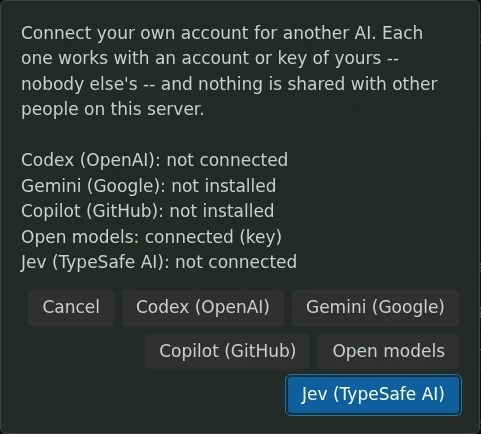
A key per open model
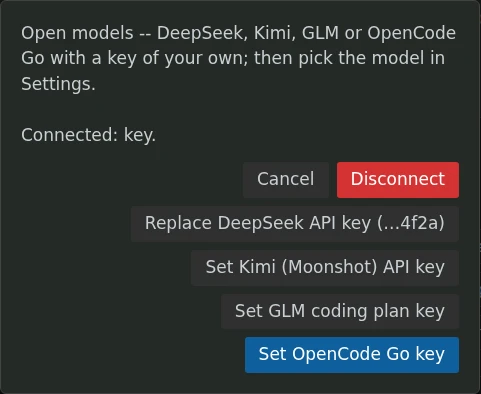
Make > Connect Another AI, in a demo studio. Every engine with its state; Open models takes a key for DeepSeek, Kimi, GLM or OpenCode Go, and the studio only ever shows the last four characters of a key.
-
The studio picks a fitting one
Choose an engine for a role, a ticket or a whole fleet yourself. Or leave it open: with two or more connected and the optional decision model switched on, the studio suggests the engine that suits the kind of task, and says why. What you choose yourself always wins.
- With the decision model on, the studio suggests an engine for the kind of task, and shows how sure it is.
-
A limit does not stop the work
A rate limit, a usage cap, an overloaded server: the run moves to another connected engine at once. It takes the same task, the same role and what the agent had said so far, and first looks at what is already on disk. You are told where it happened, and the run is booked on the new engine.
- If one hits a limit, the run goes on with another.
- See what every run used in Cost & usage, call by call.
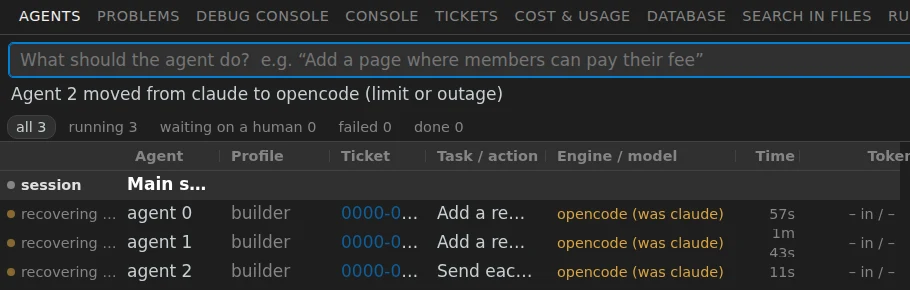
A real move, recorded in a demo studio where the first engine answered with a rate limit: the notice above the list, and every row saying where it came from.
Why one AI provider is a risk
An organisation that runs its work on one AI provider has a single point of failure it does not control. These are the ways a provider can drop away:
- A rate limit or an outageThe work waits, or moves to another model.
- A price change, or a plan that disappearsYou negotiate, or move to another model.
- Export rules, sanctions, a country excludedMoving to another model is the only answer.
- A category of work refusedMoving to another model is the only answer.
- An account suspended by an automatic signalYou mail support and wait, or move to another model.
- In every caseThe answer is the same: carry on with another model. In Wantzel Studio that is already set up.
One honest note: models are not interchangeable. Moving keeps you working; it does not give the same answer word for word. For software built in the studio that matters less than elsewhere, because the compiler judges every result, whichever model wrote it.
Your AI costs, in your hands
You pay each provider directly, at their price. The studio adds nothing on top. Give routine work to a cheaper open model and the hard work to the strongest one; set it per role, per ticket or per fleet.
The price of Wantzel Studio itself is one amount for your organisation, whichever models you use and however many runs you do. What the price covers
Read next
Work with the AI you choose
EUR 500 a month per organisation
Leave your email address and you get an invitation when there is room for your organisation.